 I looked around for a migration script to port my blog from BlogCFC over to WordPress and didn’t find anything so I wrote one. First lemme say that BlogCFC is a great piece of software and I don’t want to encourage anyone to move away from it. For myself the decision to move to WP was one of those “eat your own dogfood” choices. 100% of the stuff we’re building at Grid7 right now is centered around Structured Blogging and Microcontent. WordPress and Moveable Type are currently the only two authoring tools that have plugins that support this. For me to advocate microcontent without having the ability to publish it would be like Ray advocating BlogCFC and hosting his own blog on WordPress. Plus removing barriers to exit on a piece of software should theoretically increase the adoption of its usage because people can now safely use it knowing that they aren’t locked in permanently. Anyways, I asked Ray if he was cool with me releasing this code and he had no problem with it. There is a Readme included but basically here’s what you do:
Download the BlogCFC2Wordpress.zip file
- Setup a new instance of WordPress (you’ll need to be able to run CF and PHP side by side)
- Configure a datasource in CF administrator for your new WordPress db.
- Extract the contents of the zip file to a directory on your site
- Modify the config.ini file to reflect the source and target datasources
- Provided you want a fresh install you should clear out the dummy data that comes with WP
- Run the RunMe.cfm file
- Delete the BlogCFC2Wordpress directory
- Two optional last steps
- put the rss.cfm file in the root of your wordpress blog to keep all your old subscribers
- put the index.cfm and qBlogCFCPosts.xml files in your root to handle redirects for all your old links
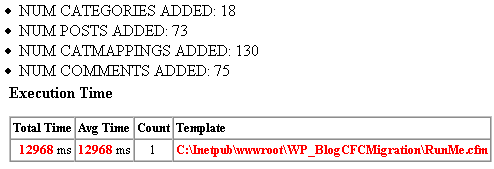
Provided that it worked you should see a screen that looks like this->
Obviously you’ll need to mimic the directory structure of your BlogCFC instance so all the files referenced in your posts continue to work. I just moved my downloads and images directories over and it worked fine. I updated the stylesheet to include the .code classes so inline code would display properly. There were some weird idiosyncracies with the way that the inline embedded flash player was handled by WordPress/php but that was really the only gotcha and I just referenced it in a new window on entries where it broke (it was something to do with the
The code is actually commented (i know, crazy right?) and makes heavy use of components so it may have some instructional value. There’s some other nuggets in there and one technique in particular that I’ve started doing (and I don’t know whether this equates to CFUnit or another type of unit testing – i’m admittedly horrible about not writing unit tests) but it’s been a time-saver on another project where I’m dealing with a long sequence of calling various components that access external systems to get the objects I need to do an operation. Basically it’s a few lines of code that lets you serialize the object and write it to a file so that for testing rather than calling the components each time, you can instead read the file and deserialize it to create the same object so it behaves as if it were getting it from the prior sequence. This may be old hat for others but it’s a technique that has saved me time and the pain of repeatedly clearing out database entries.
The performance of the migration script is fine for me (it took 13secs to move 73 posts, 75 comments, 130 category mappings and 18 categories). It’s admittedly not optimized (I prefer the syntax and I realize it instantiates the component on each request under this method). There’s plenty of room for improving this with the function-style syntax for instantiating objects and for someone like Ray who has 5000+ posts you might have to (or else bump your Timeout in the CFadmin) but it worked fine for me and I have no desire to do this. I’ve tested it against CFMX7, MySQL 4.1 and Win2k3 with BlogCFC v. 3.8 to WP v.2. There are some new fields in the latest version of BlogCFC so you would need to make a few minor modifications to the query syntax but it should be pretty painless. Also the sql is vanilla with no stored procs (all the logic is in the cfc’s) so it should also work with other databases like Postgres or MSSQL and it should run fine on BlueDragon. It should be noted that I did end up using a queryToArray utility found here and this is embedded in a util component in the distribution.
The usual discalimer applies on this code – backup your WP db before you use it if there’s anything that is worth saving! I’m not providing support on the code. You can repost it and take it apart and make it better if you want but please leave the original comments and license intact. It’s the MIT license which is as close to having no license as you can get.
One thing – I was on the fence about using feedburner because athough I wanted the stats and the other promotional and convenience features they offer, I didn’t like the idea of promoting an RSS link I don’t have control over (ie. they decide to start charging and have you hostage by having control over your feed). My partner came up with the great idea to use a link that redirects to feedburner. Simple and genius.
Big ups to Ray Camden and Matt Mullenweg for writing useful Blog authoring tools. Hopefully this migration utility makes both products more accessible to others.
Oh, and in the never-ending pursuit to master the art of the tripodless qtvr, I took one yesterday in the middle of the pool at this pool party we went to on the side of Camelback Mountain. It was like the house they blew up in Lethal Weapon 2 and it was was every bit as ridiculous as it looks.