 The conference here in San Francisco is winding down and I wanted to share a random collection of thoughts in no particular order.
The Good
As always it’s the hallway conversations at these events that are by far the most valuable bits. There were a good number of companies here (~20?) and I was able to meet the principles of just about all of them and talk with them about what challenges they have in delivering their products. There seems to be an energy in the air perhaps due to the YouTube acquisition earlier this week that indicates tech investments are once again where it’s at. So this is an exciting time to be in this field. There were a few demos that caught our interest for apps like SystemOne, Vyew and SmartSheets that look really interesting. And meeting the guys who built WordPress and Tech Dirt was very cool.
The Not-so-good
I hated the term “Web 2.0” but I realize I hate the term “Office 2.0” even more. If I’d have charged the conference sponsors a nickel for each mention of this term throughout the panels, I’d have recouped my entrance fee and have our second round of funding for JumpBox. Far too many of the demos given here showed off these me-too MS-copycat products ported to the web with a bunch of slick AJAX features. While this might have turned me on a couple years ago for the implementation details of how they pulled it off technically, it now feels like “features for features’ sake” and smells “bubblish” in this sort of silly exuberance over things that really aren’t that cool. To me the real productivity gains to be made in an office come from not having to think about software at all, getting rid of the lame problems that plague IT departments and, if done right, getting rid of the IT department itself. Gains will be made as we learn to unearth the underground insight of the organization that locked away in the form of unapplied knowledge. I’m way more excited about apps like InklingMarkets and the proposition of bringing the power of internal prediction markets to the office than I am about authoring a word doc within the browser. I just feel like most of the companies hawking their wares here are missing the boat.
That being said, I don’t discount the value of better tools for collaboration. I just think that if I were running a larger company and had $10k to invest towards the goal of improving our productivity, I would spend zero on software apps and instead train all my employees on how to use David Allens GTD program, give them an incentive bonus for whoever comes up with the most innovative/effective improvement and then turn them all loose with an in-house instance of Trac/SVN to use in collaborating. The apps that did catch my eye here:
- Vyew – a slick way to do a shared whiteboard synchronously as well as asynchronously
- Koral – painless knowledge management
- SystemOne – an intelligent self-building wiki
- SmartSheets – a better method for excel/email-based project management
- oDesk – be Big Brother for your outsourced development efforts
Beyond those, the other apps I looked at really appeared to be just minor enhancements to existing ideas with little innovation. The new Tech Insight Commnity thing is interesting- essentially a way to disrupt expensive research from analysts like Forresters, Gartner’s and Cahner’s InStat by drawing upon cheap, qualified labor of bloggers around the world.
Eighty percent of the demos were sub-par unfortunately. I’m thinking there really might be a market for pitching yourself as a hired gun who can effectively demo a company’s product and grab the audience, because apparently most CEO’s are inherently bad at it. Most of the speakers were so immersed in the features of their own product, they dove into this highly-technical tutorial of the guts of how their products work rather than establishing that emotional connection with the audience members for why they should even be listening in the first place. That coupled with some connectivity issues due to sharing wireless with the conference attendees and a rare server outage for google mail (which everyone seemed to be using as the example email service) made some of the demos really painful.
To summarize though- some great people in attendance, a bit of a confused message (please please please let’s drop the 2.0 suffix on terms), good energy and vibe in general. Let’s just remember that the best technology are the ones we never notice (the refrigerators, the air conditioners, the airbags, the backup generators). Office 2.0 should be about simplifying not complicating the role of tech in the workplace.





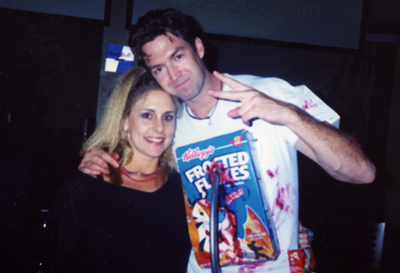



 I’ve been meaning to buy an iPod nano for awhile so I could use the Nike + running appliance to track my runs. We received Nano’s for attending the Office 2.0 conference last week in SF so I finally picked up the Nike device this week and just tried it for the first time today. All I can say is that this is what Web 2.0 is truly about. It has nothing to do with AJAX and rounded corners- it’s simple, invisible technology that bridges your real life with online and quietly improves your quality of life, gives you useful information to enhance your health, connects you with health-conscious strangers, motivates you to stay in shape and allows you to talk smack with friends on the other side of the globe all in the pursuit of better fitness.
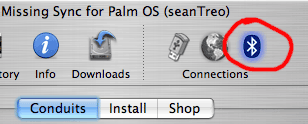 What ended up being the problem was an obvious mistake on my part in failing to enable the bluetooth connection from within the Missing Sync software. Apparently the bluetooth is turned off by default and the interface for enabling it is an icon which glows blue when it’s on. I missed this crucial step so the bluetooth connection was working fine but my phone was effectively “knocking on a door that nobody knew to answer.” Once the Bluetooth was enabled from within Missing Sync, all worked perfectly.